Content: Generative AI Tools
In previous sections, we focused on what large language models are, how to communicate with them, and what their limitations are.
In this section, we shift from the model itself to the tools built on top of it.
Many people do not interact with a raw model. Instead, they use applications that combine language models with interfaces, file upload, web search, document grounding, image generation, or organizational data.
For this reason, AI literacy also requires understanding how AI tools are designed and used. Users need to understand not only what a model can do, but also what a specific tool is designed to do, what kind of data it uses, and what kinds of outputs it produces.
The tools introduced here are examples, not a complete list. New tools appear quickly, and existing tools change often. The goal is not to memorize product names, but to learn how to evaluate different categories of AI tools in practice.
AI for enterprise
Some AI tools are designed for workplace and organizational use.
These tools are often integrated into productivity systems such as email, documents, spreadsheets, meetings, and internal knowledge platforms. In these settings, the system may draw not only on a general model, but also on organizational files, messages, calendars, or internal documentation that the user is permitted to access.
Because of this, enterprise AI tools are often discussed together with retrieval. In simple terms, retrieval means bringing relevant documents or information into the model’s working context before it generates an answer. This can help make the output more specific and better grounded in organizational material, though it does not guarantee correctness.
Microsoft 365 Copilot is an example of an enterprise AI system integrated into workplace software. Depending on the app and permissions available, it may help users draft documents, summarize meetings, search internal files, organize information, or generate reports from work content.
At the University of Kentucky, the UK ADVANCE team provides guidance and recommendations for faculty, staff, students, researchers, and clinical contexts. These materials are useful because they show that AI tool use is shaped not only by convenience, but also by institutional policy, privacy requirements, and professional responsibility. For example, some kinds of student data may require FERPA-compliant systems, and clinical or patient-related information may require HIPAA-compliant systems or other secure institutional environments. For this reason, not every commercial AI tool is appropriate for every task, even if it is easy to access.
Goal: Observe what advantages an enterprise AI tool may have when it is connected to institutional files and workplace systems.
Because University of Kentucky students have access to Microsoft 365, you can use Copilot directly for this activity.
Try one simple task in Copilot that involves institutional or personal academic work.
For example, you might:
- ask Copilot to help you find or summarize a file in OneDrive
- use the Work tab to locate information connected to your Microsoft 365 environment
- compare how easily Copilot can access your files or context compared with a general chatbot
As you try the tool, consider:
- What advantage does Copilot have because it is connected to Microsoft 365?
- What kinds of files or context can it access more easily than a general LLM?
- What would still need to be checked or verified?
Then compare the experience with a general LLM.
Consider what becomes easier in Copilot, and what remains similar across both tools.
Finally, review UK ADVANCE guidance. Choose one set of guidance relevant to your role or interests, such as faculty guidelines, professional guidelines, research recommendations, or clinical guidelines.
As you read, consider:
- What kinds of data or tasks should not be entered into a general commercial AI tool?
- What examples show the difference between a convenient tool and an appropriate tool?
- How do institutional guidelines change the way you think about AI use in practice?
Further information
AI for research
Some AI tools are designed to support research, reading, and source-based analysis. These tools often differ from general chatbots because they are built around specific source collections, scholarly infrastructure, or user-provided documents.
Scite is a research tool centered on scholarly literature and citation context. One of its best known features is Smart Citations, which help users examine how one paper is cited by later papers. Rather than showing only that a citation exists, the system may help users inspect whether a citing paper appears to support, contrast with, or simply mention the cited work. This does not replace reading the paper itself, but it can help users move beyond citation counts alone.
Goal: Explore how Scite supports research through both citation context and its Assistant feature.
University of Kentucky users can access Scite through the university. If you need help getting started, see this setup guide: Sign Up for Scite.ai Account.
Step 1: Choose a topic
Select a topic related to your field or this course.
For example:
- AI literacy
- misinformation detection
- digital archives
- metadata automation
Step 2: Try Scite Assistant
Ask Scite Assistant a question in natural language.
For example:
- What are current research themes in AI literacy?
- What are common concerns about misinformation detection?
- What recent research says about AI in libraries?
As you examine the response, look at the references and consider:
- Are the references real papers with real DOIs?
- Does the answer feel more grounded than a general chatbot answer?
- Can you inspect the supporting source text and see why it was retrieved?
Step 3: Inspect citation context for one paper
Choose one paper from the Assistant results or from a direct search in Scite.
Then review how later papers cite it.
Consider:
- Are later papers mostly mentioning it, supporting it, or contrasting with it?
- Does the citation context suggest the paper is influential, disputed, or used mainly as background?
Step 4: Reflect
Consider the following questions:
- How is this different from simply counting citations?
- How is this different from using a general LLM that may generate references without showing source grounding?
- What are the limits of relying on citation labels or Assistant output alone?
- Why should a researcher still read the actual paper and its context?
NotebookLM is a tool built around user-provided sources.
Instead of answering solely from a broad general model, it is designed to help users work with sources (documents, images, audio, etc.) they upload or specify. This makes it useful for tasks such as source-based summarization, note generation, question answering over readings, and synthesis across a small collection of materials.
This kind of tool is relevant to academic and information work because it encourages users to ground questions in a defined set of sources.
Goal: Observe how an AI tool behaves when it is grounded in a specific set of sources, and explore the different types of outputs it can generate.
If you are new to NotebookLM, see NotebookLM Help.
Begin by creating a notebook and adding a small set of sources that you are allowed to use. Avoid uploading documents you don’t have rights to.
Step 1: Add sources
Upload or connect a few sources and note what kinds of materials NotebookLM accepts.
Step 2: Ask grounded questions
Try questions such as:
- What are the main arguments across these sources?
- Where do these sources agree and disagree?
- Summarize this material for LIS or ICT graduate students.
- Generate study questions based on these materials.
Step 3: Try NotebookLM features
Explore the different outputs NotebookLM can generate.
For example, you might try:
- Audio Overview
- Mind Map
- Reports
- Flashcards
- Quiz
- Slide Deck
- Video Overview
- Infographic
- Data Table
As you try these features, consider:
- Which outputs are most useful for learning or synthesis?
- Which outputs simplify the material too much?
- Which features seem most helpful for studying, organizing, or presenting information?
Step 4: Compare with a general chatbot
Ask a general chatbot a similar question without uploading the same source set.
Then compare:
- Which response is more grounded?
- Which tool makes its connection to the source materials clearer?
- Which one would you trust more for source-based academic work?
Further information
AI for creative tasks
Generative AI tools are also used for image, video, and media creation.
These tools are often prompt-based, but they differ from text chatbots because the output is visual and interpretation is less precise. A result may look impressive while still failing to follow the prompt accurately.
Nano Banana is Google’s image generation and editing capability associated with Gemini image tools. It is useful here as an example of an AI creative tool that can transform or edit images through natural language instructions. Tasks may include changing style, modifying parts of an image, or generating a new visual based on a prompt.
Goal: Observe how an AI image tool interprets a text prompt and how prompt revision changes the result.
Step 1: Start with a simple prompt
Enter a short prompt into an image generation tool.
For example:
- A quiet academic library
- A robot helping in an archive
- A student studying with AI tools
Step 2: Revise the prompt
Make the prompt more specific by adding details such as style, setting, audience, or purpose.
For example, you might specify whether the image should look realistic, illustrated, cinematic, poster-like, or suitable for a presentation.
Step 3: Compare the results
As you compare the outputs, consider:
- Which parts of the prompt were followed well?
- Which details were ignored, changed, or added unexpectedly?
- How much did the image change when the prompt became more specific?
Step 4: Reflect
Consider why prompt revision is often necessary in creative AI tools, even when the original request seems clear.
Veo is Google’s video generation system. It is useful as an example of how generative AI is expanding beyond text and static images into moving visual content.
Video generation can be impressive for storyboarding, concept exploration, or visual prototyping. At the same time, generated video can still contain inconsistencies, unrealistic motion, or prompt-following problems.
AI for search
AI is increasingly embedded into search and discovery systems.
In these tools, the system may retrieve sources from the web and then generate a synthesized answer. This can be helpful for quick overview tasks, but it can also hide uncertainty or blur the difference between direct evidence and generated summary.
Google AI Overview is an example of a search interface that may generate a summary directly on the results page. This can help users get a quick overview, but it also changes how people interact with sources because the summary may be read before the user clicks through to the original webpages.
Goal: Examine how AI summaries in search can shape information seeking.
Step 1: Search a topic
Choose an informational query such as:
- What is metadata in digital libraries?
- What are the main concerns about AI hallucination?
- How is AI used in archives?
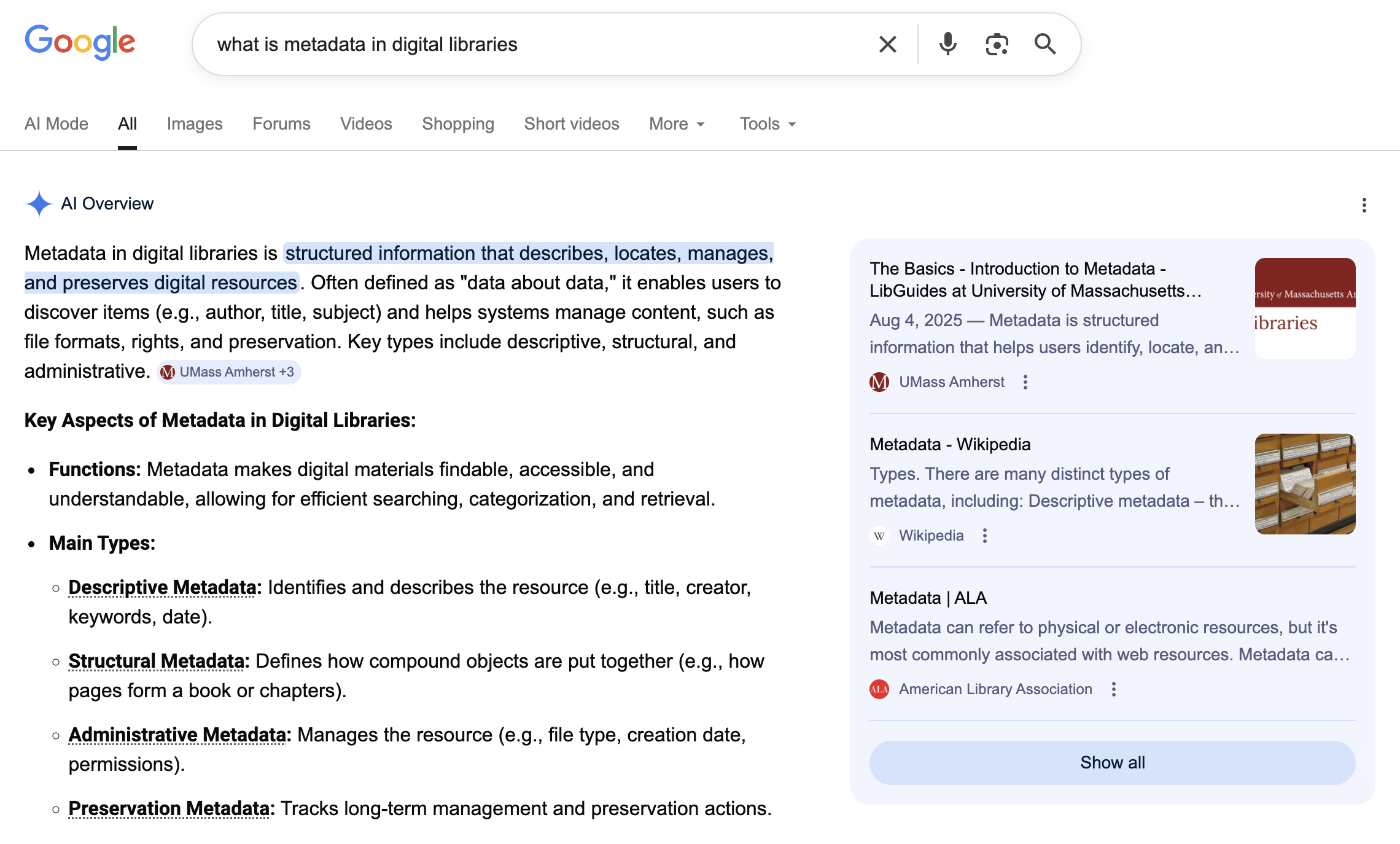
Step 2: Read the AI summary first
Before clicking any result, note:
- What claims are being made?
- Does the summary seem complete, partial, or overly confident?
Step 3: Open the cited or linked sources
Check whether the sources actually support the claims in the summary.
Step 4: Reflect
Consider:
- Did the summary save time?
- Did it oversimplify anything?
- Would you rely on it without checking the sources?
Perplexity is an AI search tool that combines answer generation with visible web sources. Even when sources are shown, the generated answer still needs evaluation. A system may cite relevant pages and still synthesize them in incomplete or misleading ways.
Goal: Compare how an AI search tool and a standard search engine support the same information task.
Step 1: Choose a “recent or current information” query
Search for something that depends on up-to-date information.
For example:
- latest news in Lexington, KY
- recent updates on a public policy or campus event
- recent developments in a technology or company

Step 2: Search in Perplexity
Read the generated answer and inspect the listed sources.
Click several links and check:
- Do they lead to a specific report or article?
- Or do they only open a general homepage, news site, or topic page?
Step 3: Search in a standard search engine
Run the same query in a search engine (e.g., Google).
Compare how results are presented:
- individual articles vs summarized answer
- headlines vs generated synthesis
Step 4: Evaluate both results
Consider:
- Which system helps you get oriented faster?
- Do the links in Perplexity point to specific sources or just general sites?
- Does the generated answer accurately reflect what those sources say?
- What details might be missing, simplified, or merged together?
- In what situations would AI search be useful, and in what situations would you prefer to work directly from search results yourself?
Further information
AI for coding
Some generative AI tools are designed to assist with coding and software development. Examples include tools such as Codex, Claude Code, and GitHub Copilot. These systems can help users write code, explain code, suggest revisions, or support software development workflows.
In this course, these tools are introduced only at a general level. They are included because they show another direction in which generative AI is developing, not because coding is expected in this class.
For students without programming experience, the main point is simply to recognize that some AI tools are built not only for conversation or writing, but also for technical tasks.
Goal: Get a general sense of what AI coding tools are designed to do.
This activity is optional. If you do not have programming experience or do not want to set up a coding environment, you do not need to complete it.
If you are curious, you may briefly explore an official demo, product page, or short tutorial for a tool such as GitHub Copilot, Claude Code, or Codex.
As you look through the example, consider:
- What kinds of tasks is the tool designed to support?
- How is this different from a general chatbot?
- What background knowledge would a user need in order to use it well?
Further information
AI for science
AI tools are increasingly used in scientific research. This does not mean that AI independently does science in a human sense. Rather, AI systems can help researchers identify patterns, predict structures, or generate candidates. Below are some example areas:
Protein structure prediction: Systems such as AlphaFold have helped researchers predict protein structures from amino acid sequences and have become one of the best known examples of AI in scientific discovery workflows. This line of work gained especially wide public attention when the 2024 Nobel Prize in Chemistry recognized protein structure prediction and computational protein design.
Drug discovery: AI is being used in parts of drug discovery such as screening, molecular design, and prioritizing candidates for further study.
Further information